Product Features
System Requirements
| Windows | Mac |
|---|---|
| Windows 7, 8, 10 (latest update) or later | MacOS 10.12, 10.13, 10,14 or 10.15 (latest update), i5 |
| 4GB RAM minimum (8GB+ recommended) | 4GB RAM minimum (8GB+ recommended) |
| 1GB minimum free hard drive space | 1GB minimum free hard drive space |
| 1920 x 1080 pixel screen resolution (recommended) | 1920 x 1080 pixel screen resolution (recommended) |
Supported Plugin Format
| Windows | Mac |
|---|---|
| VST3 64-bit | VST3 |
| Audio Units |

nickosaputrae –
Brilliant! Sangat membantu!
birdcallprrr –
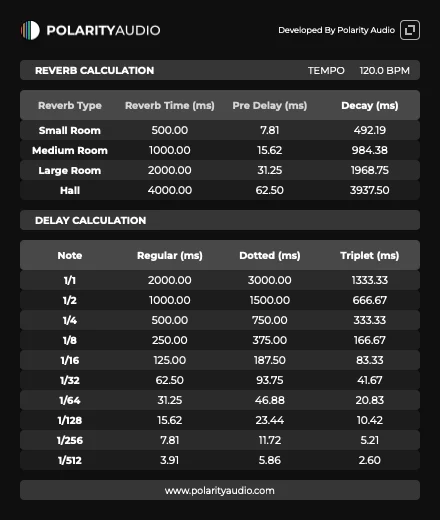
It stays at 120bpm, it doesn’t sync with the daw and also… what if one works in double time tempo???
Imo you should make a button for people working in double time bpm and put button for daw sync enable OR disable. Let us choose! 🙂
Polarity Audio –
Thank you for your feedback and input! Could you let us know which DAW you’re using? This will help us investigate the sync issue further.
djaffi –
What a great piece of software, thank’s
keep up
Polarity Audio –
Thank you bro!
Emmanuel Dwomoh –
This a really helpful utility plugin. Pls can you make it possible to choose between ms or seconds. I have to do that conversion to seconds in my head. The plugin I use have seconds as the parameter.
Brain –
Very useful
Walter –
Amei
Yuriy –
Абсолютно бесполезен показывает только 120 Удаляю!
smokeylonely –
I’m not able to tempo sync the plugin in my protools session, currently using DDMF metaplugin to load the VST3 it adds to many steps for me unfortunately, i’d love to use the plugin in AAX
Polarity Audio –
Sorry for the inconvenience, we are currently reviewing it and it will be fixed in the next version.
Vlad Lavruk –
In my Ableton Live 12 Standard, BPM synchronization isn’t working; it stays at 120 no matter what
Polarity Audio –
Sorry for the inconvenience, we are currently reviewing it and it will be fixed in the next version.